Why database performance creates business value

Why database performance creates business value

“Why does database performance matter?” “What is the business value of database speed?” “Why should I care about the performance of a database?”

Why database performance matters in a nutshell

fast-database-business-decisions

Make Faster Decisions

Database speed is the key to compute more data faster and make data-based decisions quickly. Faster decision-making drives business value.

fast-database-speed-saves-costs

Save Resources & Costs

Database speed translates into resource efficiency. Saving resources (like battery, CPU, memory) saves money and reduces waste.

improve-ux-response-times-database

Better UX & Response Rates

Database speed affects end user response rates significantly – smooth and fast user experiences keep people happy and more productive.

As a developer, it seems clear that database performance matters. At the very least, a fast database that gives you out-of-the-box speed saves time and nerves during development. Any piece of the tech stack that works super-fast makes a developer’s job easier. But there is more to it. Learn, why and how database performance impacts business value and get ideas on how to quantify this for your business case.

Data should be available when need where needed

We all dream of a future transformed by data. Cars that drive themselves to be repaired before a failure occurs. Fridges that are restocked while we are at work. Reducing resource waste to an absolute minimum. Building sustainable cities and communities.[1] It is truly amazing what is possible today…

database performance business value

Then reality hits: Before you can implement amazing solutions to make the world a better place for everyone, someone needs to solve the technical challenges, including hidden requirements. For example: you need the necessary data, and you need it available when needed where needed. This often isn’t that simple. Data persistence, database speed, and data synchronization are typical non-functional or “hidden” requirements. These are prerequisite technologies to allow the application to access, process and possibly depict the data required to answer a request (from another application or from a user), and thus enable the functionalities /  features. All in all, this is a pretty fundamental requirement. And it pays off to build your app on top of a solid foundation. Because, if you built your application on a solid foundation, every feature you dream up, no matter when,  and any next feature will be easier and faster to implement. 

Functional and non-functional requirements – the hidden challenges of your IoT project

IoT project hidden challenge

While you need data in any application, most often no one will write down where and how to handle it  as a user story or requirement. As opposed to features, e.g. “being able to search for names in the address book”, data persistence, database speed, and often even data synchronization are “hidden requirements”. Data is just expected to be available where needed when needed. Whether  the data you need really will be available when you need it, depends strongly on the database the application is using and and where this database runs. On top, the mechanisms you employ to exchange data between different devices (end devices, servers, ….) matter.

Hidden requirements are one of the major reasons why the Industry 4.0 dream is still in many respects a dream and not a reality – in Europe at least. Despite it being a topic for more than 10 years. [2]

Database performance 

What is a database?

A database is a piece of software that allows the storage and systematic use of digital information. A database typically allows developers to store, access, search, update, query, and otherwise manipulate data in the database via a developer language or API. These types of operations are done within an application, in the background, typically hidden from end users. Most applications need a database as part of their technology stack.

What is database performance?

We like and therefore use the following definition from Craig Mullins (2002): “Database performance can be defined as the optimization of resource use to increase throughput and minimize contention, enabling the largest possible workload to be processed.” [3]

Why does it matter if the database runs on the edge or in the cloud?

An edge database holds data on the (end) devices, where the data is used – and typically additionally sends some parts of the data to a central place like an on-premise server or the cloud. As opposed to this, a server / cloud-based database holds all data on the server / in the cloud. Where the data sits, determines from where, when and how it can be accessed. If all data is on a central server or the cloud, the prerequisite to accessing this data is a working network connection.

Online

Offline

It follows that edge applications are based upon a distributed computing paradigm, allowing edge devices to be autonomous. On the other hand, cloud-based applications are based on the centralized computing paradigm, where one central instance is in charge, with all other devices being dependent upon this central instance. This significantly affects the response time of the application, the availability of the application, and last not least the bandwidth needed for the application, which also translates into cloud costs.

database performance business value

Location matters: while a fast database gives you fast response times, if the database sits in the cloud and needs to be called from edge devices, you need to factor in  the duration it takes to request the data and get a response. And with any networking you cannot guarantee response times or ensure it is always available. While this is not the database performance itself, it highly affects application performance. 

The impact of database performance on your business

Database performance matters. Whether your solution needs the speed, because of the necessity to re-act in (near) realtime, or to keep your users (customers, employees, …) happy, productive, buying, or just to save costs for stronger edge hardware and the cloud. “Considering that even a single moment of latency or downtime can cost companies thousands of dollars, the speed advantages of edge computing cannot be overlooked.” [4]

The necessity of database speed for mission-critical, security relevant, (near) real-time functionalities 

If you need near real time functionalities, every piece in the tech stack matters, but the database has a particularly strong impact on the response rates of your application. Consider autonomous driving, healthcare and security applications, or IIoT solutions for production lines: Any application supporting such a scenario needs to respond reliably with speed. “This is not the same as a lag in loading your favorite cat pictures. A lag in a moving vehicle scenario is a matter of life and death.” [5]

Accordingly, if end devices like cars, smartphones, health trackers, machines on the factory floor are involved, a purely cloud-based application is not an option. Data needs to be stored and used on the devices directly. Thus, an edge database is necessary. Ideally, an extremely fast one.

Examples of use cases with a need for database speed

Anything running on a car really needs to be highly ressource efficient and fast. Ressources on the car are highly limited and database speed translates into ressource-efficency. Autonomous driving capabilities are a special case requiring significant compute power to run the algorithms in real-time within the control unit of the car. As can be easily deducted from first-hand driving experience, during this kind of constant information processing and instantaneous decision making, every fraction of a millisecond counts. Information processing speed and reliability (guaranteed QoS parameters)  is of the essence for driver assistance and autonomous driving.

Moving to a purely monetary example, let’s consider roadside tolling. In roadside tolling, the edge devices on the side of the road need to process the information from a moving vehicle in order to identify the car, bill according to usage, and detect violators. Ideally, it even informs the car owner of the result. As the car is constantly moving and can be going fast, all of this needs to happen in a very short amount of time. A super fast database lookup on the edge is key to avoid money loss and deliver good customer service. 

For a final example,  let us look at an Industrial IoT (IIoT) application: Additive manufacturing. 3D printers use layering techniques with a variety of materials to quickly create custom designed parts. During the layering process, the controller needs to quickly and efficiently incorporate small changes in the environment (e.g. an increase in temperature) to ensure quality and accuracy of the part. Faster and more precise manufacturing is currently limited by the I/O throughput. With a fast database, the I/O throughput is higher, allowing for more complex and finite production.

In short: A superfast database is not a nice to-have, it is a must-have. The database speed a database brings out-of-the-box is critical for such an application.


The impact of database speed on Sales, Conversions, Retention (or at least, nerves) 

There is a reason Google forces companies to optimize their websites and mobile applications for performance: There is a wealth of research and evidence that suggests response rates of websites and mobile applications impact user behavior significantly.[6] Even more, there are several studies providing evidence that response rates impact actual buying behavior. [7] While there is less research on other digital applications like e.g. a desktop app or workplace software, some studies have shown that needing to work with slow applications decreases employee satisfaction and productivity. [8]

The impact of database speed on battery, CPU, hardware and related resources

Another hidden requirement typically is resource-efficiency with regards to CPU, RAM, Disc space and battery / electricity. For any application running in the cloud, these requirements are balanced in the backend as the cloud scales vertically. It “only” adds to cloud costs (and is a waste of energy – not to mention all the infrastructure / hardware enabling that waste). 

On the edge, you typically work with restricted devices, meaning you can only use the devices’ resources, which can be pretty limited. Therefore, inefficient applications can push a device to its limits, leading to e.g. slow response rates, crashes, and battery drain. Security is a very necessary cross-the-stack functionality that often impacts performance. While data that stays on the edge is challenging to hack, edge data needs to be protected just like data in the cloud.

How database performance impacts the business value of your IoT application

All applications on one device share the available hardware capabilities; resource allocation is managed by the operating system. Accordingly, the more resources an application or the database uses, the less resources are available for other uses. The faster a database executes its operations, the less CPU it uses, the less battery / electricity, and typically also memory. In practice that means there are more resources available on the device to run e.g. Edge AI or Edge ML applications.

database

From a business value perspective that means:

  • You can save on hardware costs (CPU, RAM, Disc, Memory, …): either do more on existing / chosen hardware, upgrade hardware later or choose smaller and thus less expensive hardware. 
  • You can save on energy and cloud costs: The more efficient, the less electricity, the less cloud costs. This can add up tremendously as projects scale.
  • You can add more features, deliver more functionalities, make your application more secure within a given environment. 
  • You can deliver a smooth, fast user experience, enabling applications that deliver in near-realtime. 

    In sum, it clearly impacts the cost structure and value you can deliver.

database performance business value

Database performance impacts business value, directly and indirectly

As projects scale in size and scope, hidden requirements like database performance often become clear. At scale, small issues like delayed data, or data volumes, become big headaches. Ideally, these sorts of requirements would be at the heart of the design stage of any project – and budgeted for at the beginning. The choice of database clearly has a huge impact on the business success of IoT applications.

[1] See https://www.weforum.org/agenda/2018/01/effect-technology-sustainability-sdgs-internet-things-iot/ for IoT impact on Sustainable Development Goals (SDG)
[2] https://restart-project.eu/much-know-industry-4-0/
https://www.google.com/url?sa=t&rct=j&q=&esrc=s&source=web&cd=13&cad=rja&uact=8&ved=2ahUKEwiGidSA6trnAhVQY8AKHTpSDUIQFjAMegQICBAB&url=https%3A%2F%2Fwww.mdpi.com%2F2076-3387%2F9%2F3%2F71%2Fpdf&usg=AOvVaw3cx44OOMfNzJ_BJlCG8Gfj
[3] Database Administration: The Complete Guide to Practices and Procedures By Craig Mullins 2002
[4] https://www.vxchnge.com/blog/the-5-best-benefits-of-edge-computing
[5] https://www.zdnet.com/article/why-autonomous-vehicles-will-rely-on-edge-computing-and-not-the-cloud/
[6] https://developers.google.com/web/fundamentals/performance/why-performance-matters https://www.thinkwithgoogle.com/intl/en-154/insights-inspiration/research-data/need-mobile-speed-how-mobile-latency-impacts-publisher-revenue/
https://www.machmetrics.com/speed-blog/how-does-page-load-time-affect-your-site-revenue
https://datadome.co/bot-management-protection/website-performance-how-to-increase-your-business-by-blocking-bots/
[7] https://developers.google.com/web/fundamentals/performance/why-performance-matters
https://www.thinkwithgoogle.com/intl/en-154/insights-inspiration/research-data/need-mobile-speed-how-mobile-latency-impacts-publisher-revenue/
https://www.machmetrics.com/speed-blog/how-does-page-load-time-affect-your-site-revenue
https://datadome.co/bot-management-protection/website-performance-how-to-increase-your-business-by-blocking-bots/
[8] https://drum.lib.umd.edu/handle/1903/1233
https://www.tandfonline.com/doi/abs/10.1080/01449290500196963


ObjectBox Java 2.4

ObjectBox Java 2.4

Update: newer versions were released; check the changelog for details. 

The 2.4.0 update of ObjectBox for Java (and Kotlin) is here. We encourage everyone to update to this release, as it includes quite a few quality of life improvements and resolves many of the issues that you have reported, so thank you for that!

This is also the first release where the ObjectBox LiveData and Paging integration has migrated from Android Support Libraries, to Jetpack (AndroidX) Libraries. If you are using those features, check the upgrade notes for possible changes that you need to make to your app.

Also note that this version makes some changes to the generated MyObjectBox and JSON model file. Make sure to commit changes to the model file after building your app. Also, if you are using a library that ships with a pre-generated MyObjectBox file, that library needs to be updated to 2.4.0 as well.

Besides those improvements, we were also fine-tuning performance a bit. While fixing a performance regression for 32 bit CPUs related to ordered queries, we were able to do additional optimizations. Now ordered queries using a limit run up to three times faster than before.

For a list of all the changes, please check the changelog.

Last not least, let us share some related ObjectBox’ developments in the mobile space. Today, we also released version 0.3 for ObjectBox Dart. So, if you are interested in creating Flutter apps, you will be able to use ObjectBox soon. Last month, we released ObjectBox Swift 1.0. Therefore, you can build native apps with ObjectBox for the two prominent mobile platforms, Android and iOS. Additionally, we’re also making great progress with data synchronization; sign up for sync updates to be notified sync related news and to be part of the upcoming early releases.

How to benchmark database performance – and ObjectBox

How to benchmark database performance – and ObjectBox

Benchmarking the performance of databases is a science in and of itself and it’s hard to get reliable and comparable results. Therefore, we decided to note down some standard patterns and pitfalls when doing database benchmarks we learned about over the years. We are including specific notes and things to consider when benchmarking ObjectBox.

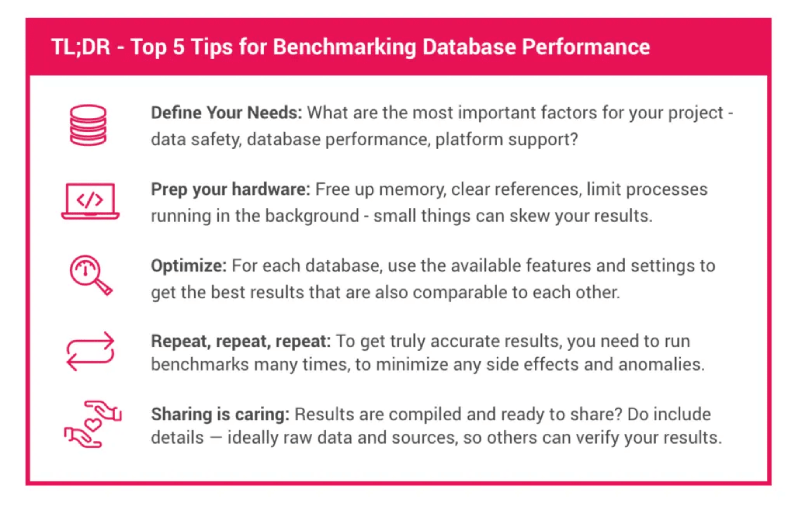
Database Benchmarking Tips

Designing a benchmarking test

Phrase your research question

When you want to benchmark databases, you will usually have a specific use case in mind and want to answer questions regarding that case. Therefore, before writing your first line of code, have a look at what it is you want to benchmark, why, and what statement you want to be able to make at the end. Just writing down a simple question like “Is X faster than Y doing A?” can help you verify that the finished benchmark actually measures what you want it to.

Start documenting

Whatever you do, document each step diligently. Benchmarks that are not properly documented are challenging to reproduce, and thus of limited worth. So, the mantra in benchmarking really is: Document, document, document. That way it is also easier to go back later and make adjustments if needed. 

Select the sample

If you have a clear use case and goal in mind, this probably determines the type of databases you are going to consider for your benchmark. Generally speaking, benchmarks should compare databases of similar type and not mix approaches that are too different. A database might be designed to run on a cluster of servers and not, like ObjectBox, on a constrained device (e.g. a smartphone, Raspberry Pi or IoT device). Or data may be stored as documents (e.g. NoSQL) and not in a relational table-like structure (e.g. SQL); or on disk and not in-memory. Consistency guarantees can also make a difference (ACID-compliance vs. not transactionally safe). Document why you chose these databases for comparison. 

Become an expert

Once you have decided on what databases and features to compare, familiarize yourself with the APIs of the products, e.g. by reading the documentation or looking at code examples. Making wrong assumptions about how a feature works can skew your results and make a product appear much faster or slower than it actually is. If the code is open source, it can also help to dive into the code to see how things actually work. For example: an insert function runs asynchronously so the function call returns immediately, but the actual insert still executes in the background. To correctly measure the actual time it takes to complete the insert, you need to do some additional work.

Things to watch out for when coding benchmarks

database benchmark

Let’s move on to some specific coding tips. A benchmark is only as good as its time measurement. Check what APIs your test platform offers to get the time; they might be affected by how and from which thread they are called. Make sure, you find an accurate way to measure the time that does not skew up your results. For example, on Android there are numerous possibilities beyond using currentTimeMillis(). 

If a measured code block executes so fast it is near the available precision of your clock (e.g. time is in milliseconds, but code takes microseconds), consider running it multiple times and measure the total time of all runs. 

Next, before starting each measurement, make sure to free up memory and clear references no longer in use by the previous measurement or setup code. If the environment your benchmark is written for uses a garbage collector, check if it can be triggered manually to free memory (e.g. System.gc() in Java). Otherwise each consecutive measurement might be skewed due to less and less memory being available or a garbage collector halting execution to free memory. In your benchmarking results, you should look out for strange results like a continual decrease in performance from run to run.

Furthermore, take into account that some runtime environments, for example the Java Virtual Machine, do just-in-time compilation. This can cause a delay the first time code is executed, but provide better performance on subsequent executions. The effect of this on the final result can however be minimized by proper testing procedure, e.g. by running a code block multiple times instead of once and measuring the total execution time.

Then something obvious, but easily overlooked, is to ensure that between the start and end of a measurement only the functionality that you actually want to compare is executed. So avoid or turn off logging (a seemingly innocent string concatenation can skew results) and construct test data outside of a measured code block.

To be absolutely sure that your code is doing what you intended it to, use a profiler to inspect resource usage during a trial run. IDEs like Android Studio and Xcode come with an embedded profiler, and there are also several standalone profilers to choose from.

Optimizing benchmarks for meaningful results – with ObjectBox examples

Before benchmarking the chosen databases, make sure you understand their differences and default settings to adjust all settings to be comparable. In the following section, we will go through the most important differences and settings you need to look out for based on ObjectBox as an example.

Transactions, Durability, Consistency, ACID – how to make your benchmarks comparable

First, be aware of the impact the use of transactions or lack thereof can have. For databases, committing a transaction is an expensive operation as it requires waiting until the disk has safely stored the data. If possible, group multiple operations into a single transaction. For example, in the ObjectBox code snippet below, there is a notable speed-up when wrapping multiple box operations into a transaction block.

Speaking of transactions, also check if using bulk operations is possible. These also use transactions to speed up execution. E.g. instead of performing a put on each entity in a list, put the whole list.

The ObjectBox transactions docs provide more details and are available for Java, Swift or Go – though the basic principle is the same across languages. 

Second, and closely related to transactions, are durability guarantees when writing data. This is about the “D” in the popular ACID acronym (Atomic, Consistent, Isolated and Durable). ObjectBox transactions and standard (non-async) operations are fully ACID-compliant.

Thus, pay close attention to what durability modes other tested databases guarantee, or respectively, which durability mode you want to measure. Most NoSQL databases don’t give hard durability guarantees. Some provide an extra command or special mode to enforce durability. Therefore, if your use case needs to ensure data is actually stored safely after a write operation, you would need to enable this durability for other databases when comparing to ObjectBox.

On the other hand, if you are interested in scenarios that emphasize performance over durability, you should look into the OjectBox async APIs. Those don’t come with durability guarantees unless you define “checkpoints” in your code to wait for async operations.

Indexing – how to make your database queries efficient

Third, when measuring query operations, see if you can use indexes, another typical database optimization. If the database has an index on a property that is used in a query condition, it can find matches much faster. 

An index makes queries “scalable” – the more objects are stored, the more an index makes sense. Without an index, a database has to do a “full scan” over all potential results. 

Number of objects and the disk bottleneck – how to measure the database and not the disk

And lastly, keep an eye on the number of objects you operate on. For example, if you put a single object, something like 99.99% percent will be spent on disk I/O. Thus, if you test this on several databases, the chance of getting about the same results on all databases is quite high. The limiting factor is always the disk. So if you want to measure the efficiency of converting objects into their persisted counterparts instead, you should look at much higher object counts to factor the disk out of the equation. Depending on the disk and device speed, a bulk “put” of 10K, 100K or 1 million objects will make more sense to measure in this context.

Multi threaded tests – how to set writers and readers

ObjectBox is build upon a multiversion concurrency control foundation, and thus is ready for multi threaded access. Each thread will have a consistent transactional view of the data. ObjectBox differentiates between “readers” (a thread currently in a read transaction) and “writers” (a thread currently in a write transaction). Readers never block; no matter what goes on in other threads. However, a writer will block other writers when using standard transactions. Writers are sequential; only a single writer can be run at any time. Thus, if your load is write-heavy in multiple threads, you may want to look at the asynchronous APIs of ObjectBox. These handle write operations very efficiently; no matter how many threads are involved.

Extending the database size limit – size matters

By default, ObjectBox limits the database size to 1 GB to avoid filling up the disk by accident (e.g. your code has a bug in a data insertion loop). So if you use large data sets to benchmark, we recommended increasing the maximum database size when building the box store.

Preparing the benchmarks: devices and platforms

Once your benchmark code is ready, it’s time to set up the test device(s). The first step is to ensure other apps or processes are not doing (too much) work while your measurements run. Ideally, you would use a clean device with no apps installed or services configured. This is especially true for mobile devices: once you connect them and they start charging, the operating system might wake numerous apps to perform background work or network updates. You can somewhat avoid this by switching on airplane mode. And to be safe, wait a few seconds after connecting the device. 

Also ensure, this is again important for mobile devices, that your device does not enter a low power mode which reduces performance. For example on Android, keeping the screen on typically prevents that. When running on a laptop, check whether the power supply is plugged in and which power mode your operating system is set to. You may explicitly want to test in a certain power state or with the default behavior.

And just to mention it, make sure to turn off any profiling or monitoring tools that you used during building your benchmark. They can significantly skew your results.

When running on multiple devices, pay attention to the differences in hardware, like available memory and processor model, but also in software, like the operating system version. Different hardware and software might have different optimizations that can skew your results. Again, do not forget to document your device and software setup, so results can be properly interpreted and reproduced.

Running the database benchmark and collecting results

When it is time to run the benchmark it’s good to run it not once, not twice, but many times. This minimizes the impact of the various side effects we discussed above. Output the results of each run into a comma separated (CSV) or tabulator separated (TSV) format, that can easily be imported in a spreadsheet application for analysis. You can look at how the ObjectBox benchmark does it.

Once you have collected some data, verify its quality. You might have already spotted outliers while perusing the results. Alternatively, calculate the average of all measurements and see if it deviates a lot from their median value. If you are familiar with it, look for a high variance value instead. Too many outliers or a high variance might hint at side effects of your benchmark code or device setup you have not considered. Better double check to be sure.

Also coming soon ObjectBox time series which will provide users an intuitive dashboard to see patterns behind the data. It will further help users to track thousands of data points/second in real-time.

How to publish meaningful database performance benchmarks

The final step is to share your results with the world (or just your team). Make sure it’s clear what exactly you have measured and how you have arrived at those results. So include which device and software was used, how they were configured, what you did before running the benchmark and how the benchmark was run.

If possible, share the generated raw data so others can verify that your calculations, and remember to lead to the published results. Even better, publish the source code as well, so others can run it on other devices or help you spot and fix issues.

Last not least: Be careful to draw conclusions. Rather let the data speak for itself. Respond to questions and feedback. Be honest, if you learn your benchmarks may be skewed and update them. In the end, everyone wins by getting more meaningful results.

Your content goes here. Edit or remove this text inline or in the module Content settings. You can also style every aspect of this content in the module Design settings and even apply custom CSS to this text in the module Advanced settings.

ObjectBox Go 1.0 release and performance benchmarks

ObjectBox Go 1.0 release and performance benchmarks

ObjectBox 1.0 is here. Late last year, we introduced ObjectBox to the world of Go – and were awestruck by the GitHub traction and feedback we got. So we doubled down on our efforts and are thrilled to announce 1.0 with many new features, a stabilized API, and improved performance. From now on your projects are safely able to upgrade.

For those of you new to ObjectBox, here is how ObjectBox persists Go structs (objects):

ObjectBox Go 1.0 – Highlights

Let’s recap what ObjectBox Go brings to the table:

  • automatic schema migration (e.g. adding new structs or fields just works)
  • type-safe APIs, e.g. no interface{} arguments
  • embedded database – no server needed, all data stored on the device
  • Go structs as data (also embedded structs); no ORM, no SQL
  • relations: to-one, to-many (eager and lazy fetching)
  • powerful queries with indexes for scalable lookups
  • ACID compliant with implicit (automatic) and explicit (user defined) transactions
  • superfast bulk/batch operations
  • low memory usage
  • runs on 64-bit Linux, macOS, Windows, small 32-bit ARM-based Linux devices (e.g. Raspberry Pi)

How fast is ObjectBox Go? Performance Benchmarks

To see how ObjectBox compares performance-wise, we looked at libraries with comparable levels of storage abstraction – so not just plain SQL/Key-value storage but also ORM features. Finding embedded data storage libraries satisfying those simple criteria wasn’t so easy, but we have picked a few based on GitHub popularity:

  • GORM using SQLite – GORM supports multiple backends including the embedded SQLite database.
  • Storm using bbolt – while Bolt DB is not maintained anymore, it’s fork bbolt seems to be picking up traction.

What we tested

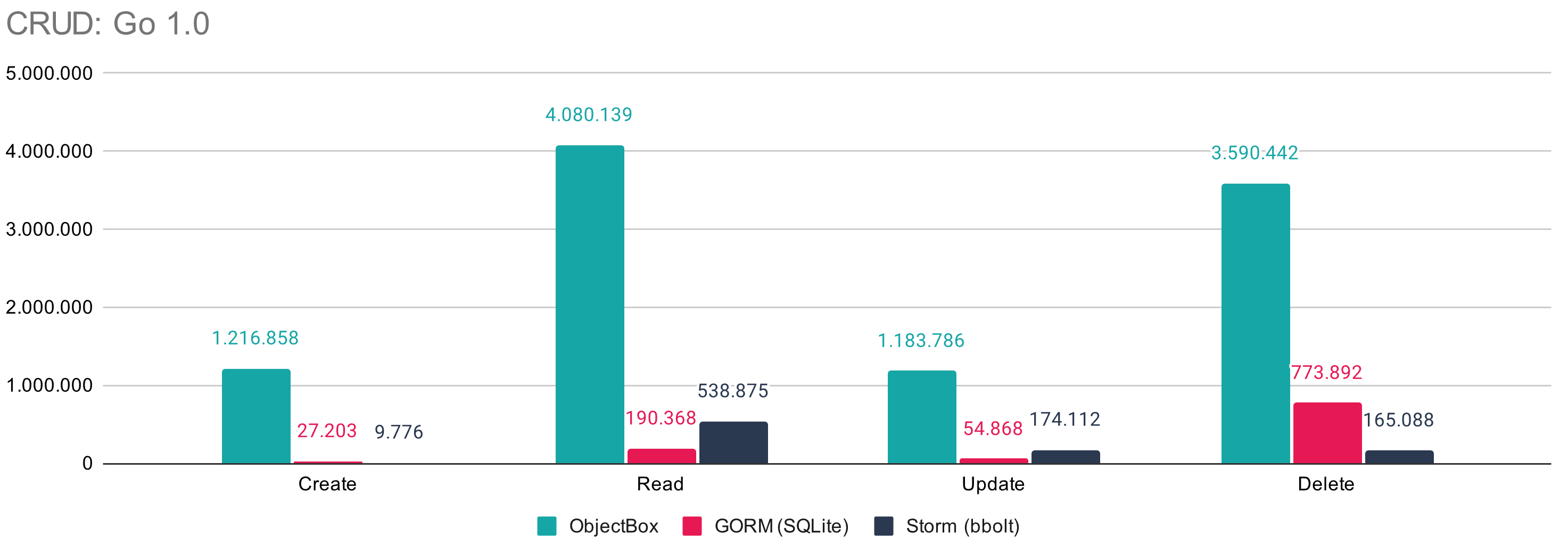
To get an overview of the databases, we tested CRUD (create, read, update, delete), indexed and non-indexed queries. Additionally, we have compared a peak memory usage of each database during a test run. Each test was run multiple times, with garbage collection turned off and executed manually outside of the measured time. Data preparation and evaluation was also done outside of the measured time.

We tried to keep the test implementations as close as possible to each other while picking the approaches recommended by the docs for each database. The test code is available at https://github.com/objectbox/objectbox-go-performance.

Test setup

The benchmarks were the only foreground application running on the PC and the given results are an average over 20 runs.

Specs: i7-8850H laptop CPU, Manjaro 18, Linux 4.19.56
Disk speeds (LUKS encrypted SSD): ~ 480 MB/s read, ~120 MB/s write 


CRUD

All operations were executed in batches, not one-operation-per-transaction. For GORM and Storm it was necessary to do a batch insert, update and remove inside a manual transaction because they don’t support batch operations out of the box.

The numbers were measured by running benchmarks for 100.000 object-sets for ObjectBox and GORM, while we have chosen to use just 10.000 objects with Storm because it was achieving better operations per second with a smaller set. We will follow up with a post comparing how each database fares with different data sets.

The standard operations you would be using all the time with any database show between 6.8 times speedup (update ObjectBox vs Storm) up to 124 times speedup (Create ObjectBox vs Storm). 

Go database benchmarks CRUD

Queries

 Next we looked at query performance by executing two simple queries. The first test uses an index (actually the “primary-key”) to fetch 100 objects. The second one to find 1111 objects based on a string prefix match (not indexed). The tests were executed 20 times and the average times (ms) are shown below. Note, the arbitrary number, 1111, is just based on how the test code prepares the data (strings contain an object ID, thus 1111 objects out of 10.000 start with the number “1”).

GORM/SQLite performance is very good for a primary-key based query but falls off when it has to use “LIKE” over the whole dataset without an index. Storm doesn’t catch up in either case.

Go-database-benchmarks-10kQueries
 

Memory usage

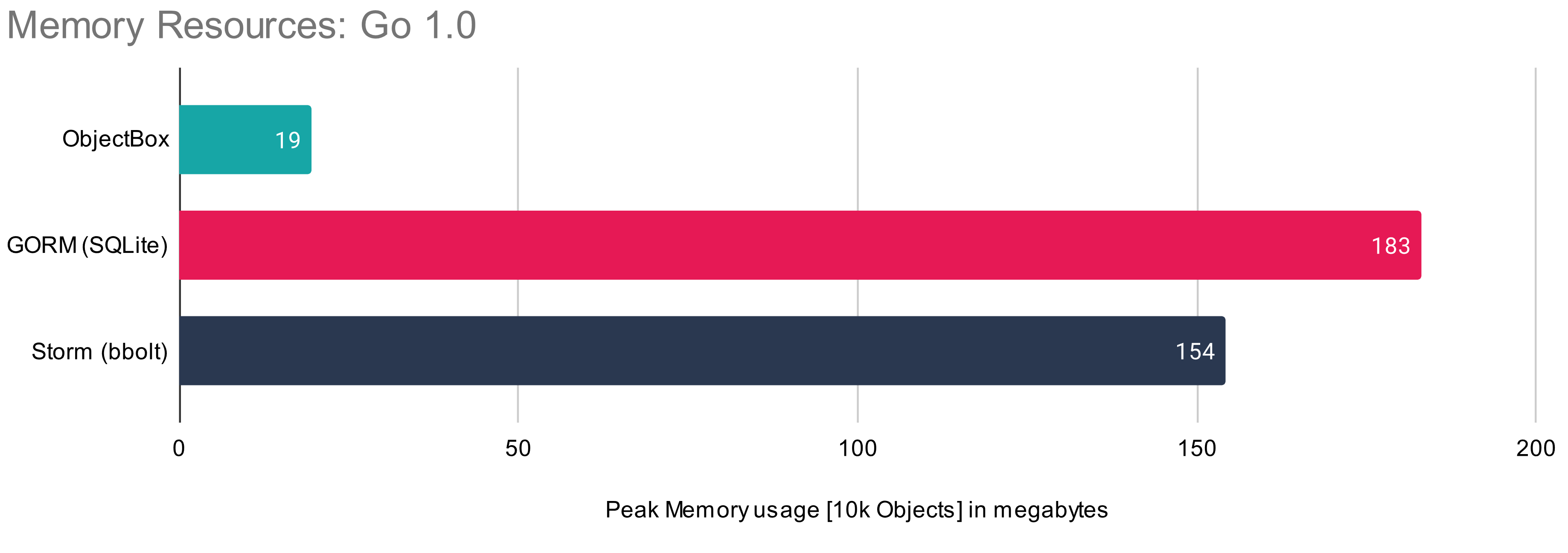
Lastly, we compared the memory usage of each solution. The peak memory usage was measured externally, executing the benchmark binary using /usr/bin/time -v, taking the “Maximum resident set size”. The memory-usage test was run on 10.000 objects with one “test-run” (as opposed to 20 runs in previous benchmarks), repeated manually to make sure there’s no reasonable difference between the runs.

This benchmark shows massive difference in memory usage, which is a good thing to think about not only for small devices but also for cloud-based resources (where RAM is comparatively pricey).  

Go database memory performance benchmarks

Of course any results you get from performance benchmarks will always be just that, benchmarks. You should consider your application needs and, ideally, benchmark the critical scenarios yourself. If you do, here you can read up a couple of tips on how to do good benchmarks. And because sharing is caring: Do let us know what you find out. Having said that, ObjectBox does show clear lead across the board so why don’t you go ahead and start using it now 🙂


Getting started

Check the ObjectBox Go docs which come with setup instructions, an introduction and information on many more topics. The ObjectBox Go GitHub repository contains all sources if you are interested in internals. Also, it comes with an example application.


Outlook

 With version 1.0 we hit an important milestone. We’re looking forward to your feedback and we’ll progress with additional features around queries, relations, and async operations. And of course, data synchronization that will allow you to share data among servers and clients. Stay tuned and let us know your thoughts. 

ObjectBox 0.9.10 – getting closer to 1.0

ObjectBox 0.9.10 – getting closer to 1.0

ObjectBox 0.9.10 - getting closer to 1.0

Do you know our new super fast mobile database ObjectBox yet? With versions 0.9.9 and the just released 0.9.10, ObjectBox made great progress to stabilize features for the 1.0 release. With an increasing number of apps using ObjectBox, we were able to spot and fix some less obvious issues. We believe that ObjectBox 0.9.10 is the most stable release ever. If you did not dare to check out the beta version yet: now is a good time to have a closer look.

(more…)