Can Small Language Models (SLMs) really do more with less? In this article, we discuss the unique strengths of SLMs, learn about the top SLMs, local vector databases, and how SLMs + local vector databases are shaping the future of AI,prioritizing privacy, immediacy, and sustainability.
Now, Small Language Models (SLMs) are stepping into the spotlight, enabling sophisticated AI to run directly on devices (local AI) like your phone, laptop, or even a smart home assistant. These models not only reduce costs and energy consumption but also bring the power of AI closer to the user, ensuring privacy and real-time performance.
What Are Small Language Models (SLMs)?
LLMs are designed to understand and generate human language. Small Language Models (SLMs) are compact versions of LLMs. So, the key difference between SLMs and LLMs is their size. While LLMs like GPT-4 are designed with hundreds of billions of parameters, SLMs use only a fraction of that. There is no strict definition of SLM vs. LLM yet. At this moment, SLM sizes can be as small as single-digit million parameters and go up to several billion parameters. Some authors suggest 8B parameters as the limit for SLMs. However, in our view that opens up the question if we need a definition for Tiny Language Models (TLMs)?
Advantages and disadvantages of SLM
According to Deloitte’s latest tech trends report, SLMs are gaining increasing importance in the AI landscape due to their cost-effectiveness, efficiency, and privacy advantages. Small Language Models (SLMs) bring a range of benefits, particularly for local AI applications, but they also come with trade-offs.
Benefits of SLMs
Privacy: By running on-device, SLMs keep sensitive information local, eliminating the need to send data to the cloud.
Offline Capabilities: Local AI powered by SLMs functions seamlessly without internet connectivity.
Speed: SLMs require less computational power, enabling faster inference and smoother performance.
Sustainability: With lower energy demands for both training and operation, SLMs are more environmentally friendly.
Accessibility: Affordable training and deployment, combined with minimal hardware requirements, make SLMs accessible to users and businesses of all sizes.
Limitations of SLMs
The main disadvantage is the flexibility and quality of SLM responses: SLMs typically cannot tackle the same broad range of tasks as LLMs in the same quality. However, in certain areas, they already match their larger counterparts. For example, Artificial Analysis AI Review 2024 highlights that GPT-4o-mini (July 2024) has a similar Quality Index to GPT-4 (March 2023), while being 100x cheaper in price.
Small Language Models vs LLMs
A recent study comparing various SLMs highlights the growing competitiveness of these models, demonstrating that in specific tasks, SLMs can achieve performance levels comparable to much larger models.
Overcoming limitations of SLMs
A combination of SLMs with local vector databases is a game-changer. With a local vector database, the variety of tasks and the quality of answers cannot only be enhanced but also for the areas that are actually relevant to the use case you are solving. E.g. you can add internal company knowledge, specific product manuals, or personal files to the SLM. In short, you can provide the SLM with context and additional knowledge that has not been part of its training via a local vector database. In this combination, an SLM can already today be as powerful as an LLM for your specific case and context (your tasks, your apps, your business). We’ll dive into this a bit more later.
In the following, we’ll have a look at the current landscape of SLMs – including the top SLMs – in a handy comparison matrix.
"The Gemma performs well on the Open LLM leaderboard. But if we compare Gemma-2b (2.51 B) with PHI-2 (2.7 B) on the same benchmarks, PHI-2 easily beats Gemma-2b."
iPhone 14: Phi-3-mini processing speed of 12 tokens per second. From the H2O Danube3 benchmarks you can see that the Phi-3 model shows top performance compared to similar size models, oftentimes beating the Danube3
OpenELM
270M, 450M, 1.1B, 3B
Apple
Apple License, but pretty much reads like you can do as much with it as a permissive oss license (of course not use their logo)
OpenELM 1.1 B shows 1.28% (Zero Shot Tasks), 2.36% (OpenLLM Leaderboard), and 1.72% (LLM360) higher accuracy compared to OLMo 1.2 B, while using 2× less pretraining data
"competitive performance compared to popular models of similar size across a wide variety of benchmarks including academic benchmarks, chat benchmarks, as well as fine-tuning benchmarks"
GPT-4o mini scores 82% on MMLU and currently outperforms GPT-4 on chat preferences in LMSYS leaderboard. GPT-4o mini surpasses GPT-3.5 Turbo and other small models on academic benchmarks across both textual intelligence and multimodal reasoning, and supports the same range of languages as GPT-4o
Smaller and faster variant of 1.5 Flash features half the price, twice the rate limits, and lower latency on small prompts compared to its forerunner. Nearly matches 1.5 Flash on many key benchmarks.
MMLU score of 69.4% and a Quality Index across evaluations of 53. Faster compared to average, with a output speed of 157.7 tokens per second. Low latency (0.37s TTFT), small context window (128k).
MMLU score 60.1%. Mistral 7B significantly outperforms Llama 2 13B on all metrics, and is on par with Llama 34B (since Llama 2 34B was not released, we report results on Llama 34B). It is also vastly superior in code and reasoning benchmarks. Was the best model for its size in autumn 2023.
Claimed (by Mistral) to be the world's best Edge models.
Ministral 3B has MMLU score of 58% and Quality index across evaluations of 51. Ministral 8B has MMLU score of 59% and Quality index across evaluations of 53.
Granite 3.0 8B Instruct matches leading similarly-sized open models on academic benchmarks while outperforming those peers on benchmarks for enterprise tasks and safety.
Quality Index across evaluations of 77, MMLU 85%, Supports a 16K token context window, ideal for long-text processing. Outperforms Phi3 and outperforms on many metrices or is comparable with Qwen 2.5 , and GPT-4o-mini
SLM Use Cases – best choice for running local AI
SLMs are perfect for on-device or local AI applications. On-device / local AI is needed in scenarios that involve hardware constraints, demand real-time or guaranteed response rates, require offline functionality or need to comply with strict data privacy and security needs. Here are some examples:
Mobile Applications: Chatbots or translation tools that work seamlessly on phones even when not connected to the internet.
IoT Devices: Voice assistants, smart appliances, and wearable tech running language models directly on the device.
Healthcare: Embedded in medical devices, SLMs allow patient data to be analyzed locally, preserving privacy while delivering real-time diagnostics.
Industrial Automation: SLMs process language on edge devices, increasing uptime and reducing latency in robotics and control systems.
By processing data locally, SLMs not only enhance privacy but also ensure reliable performance in environments where connectivity may be limited.
On-device Vector Databases and SLMs: A Perfect Match
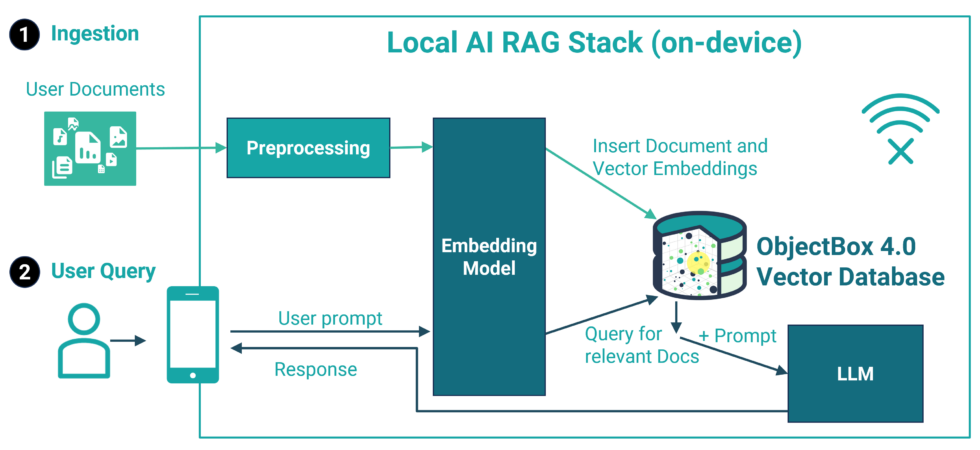
Imagine a digital assistant on your phone that goes beyond generic answers, leveraging your company’s (and/or your personal) data to deliver precise, context-aware responses – without sharing this private data with any cloud or AI provider. This becomes possible when Small Language Models are paired with local vector databases. Using a technique called Retrieval-Augmented Generation (RAG), SLMs access the additional knowledge stored in the vector database, enabling them to provide personalized, up-to-date answers. Whether you’re troubleshooting a problem, exploring business insights, or staying informed on the latest developments, this combination ensures tailored and relevant responses.
Key Benefits of using a local tech stack with SLMs and a local vector database
Privacy. SLMs inherently provide privacy advantages by operating on-device, unlike larger models that rely on cloud infrastructure. To maintain this privacy advantage when integrating additional data, a local vector database is essential. ObjectBox is a leading example of a local database that ensures sensitive data remains local.
Personalization. Vector databases give you a way to enhance the capabilities of SLMs and adapt them to your needs. For instance, you can integrate internal company data or personal device information to offer highly contextualized outputs.
Quality. Using additional context-relevant knowledge reduces hallucinations and increases the quality of the responses.
Traceability. As long as you store your metadata alongside the vector embeddings, all the knowledge you use from the local vector database can give the sources.
Offline-capability. Deploying SLMs directly on edge devices removes the need for internet access, making them ideal for scenarios with limited or no connectivity.
Cost-Effectiveness. By retrieving and caching the most relevant data to enhance the response of the SLM, vector databases reduce the workload of the SLM, saving computational resources. This makes them ideal for edge devices, like smartphones, where power and computing resources are limited.
Use case: Combining SLMs and local Vector Databases in Robotics
Imagine a warehouse robot that organizes inventory, assists workers, and ensures smooth operations. By integrating SLMs with local vector databases, the robot can process natural language commands, retrieve relevant context, and adapt its actions in real time – all without relying on cloud-based systems.
For example:
A worker says, “Can you bring me the red toolbox from section B?”
The SLM processes the request and consults the vector database, which stores information about the warehouse layout, inventory locations, and specific task history.
Using this context, the robot identifies the correct toolbox, navigates to section B, and delivers it to the worker.
The future of AI is – literally – in our hands
AI is becoming more personal, efficient, and accessible, and Small Language Models are driving this transformation. By enabling sophisticated local AI, SLMs deliver privacy, speed, and adaptability in ways that larger models cannot. Combined with technologies like vector databases, they make it possible to provide affordable, tailored, real-time solutions without compromising data security. The future of AI is not just about doing more – it’s about doing more where it matters most: right in your hands.
Easily empower your iOS and macOS apps with fast, private, and sustainable AI features. All you need is a Small Language Model (SLM; aka “small LLM”) and ObjectBox – our on-device vector database built for Swift apps. This gives you a local semantic index for fast on-device AI features like RAG or GenAI that run without an internet connection and keep data private.
The recently demonstrated “Apple Intelligence” features are precisely that: a combination of on-device AI models and a vector database (semantic index). Now, ObjectBox Swift enables you to add the same kind of AI features easily and quickly to your iOS apps right now.
Typical AI apps use data (e.g. user-specific data, or company-specific data) and multiple queries to enhance and personalize the quality of the model’s response and perform complex tasks. And now, for the very first time, with the release of ObjectBox 4.0, this will be possible locally on restricted devices.
Local AI Tech Stack Example for on-device RAG
Swift on-device Vector Database and search for iOS and MacOS
With the ObjectBox Swift 4.0 release, it is possible to create a scalable vector index on floating point vector properties. It’s a very special index that uses an algorithm called HNSW. It’s scalable because it can find relevant data within millions of entries in a matter of milliseconds. Let’s pick up the cities example from our vector search documentation. Here, we use cities with a location vector and want to find the closest cities (a proximity search). The Swift class for the City entity shows how to define an HNSW index on the location:
1
2
3
4
5
6
7
8
9
10
// objectbox: entity
classCity{
varid:Id=0
varname:String?
// objectbox:hnswIndex: dimensions=2
varlocation:[Float]?
}
</code><!--wp:paragraph--><!--/wp:preformatted-->
Inserting City objects with a float vector and HNSW index works as usual, the indexing happens behind the scenes:
1
2
3
4
5
6
7
let box:Box<city>=store.box()
trybox.put([
City("Barcelona",[41.385063,2.173404]),
City("Nairobi",[-1.292066,36.821945]),
City("Salzburg",[47.809490,13.055010]),
])
</city></code><!--wp:paragraph--><!--/wp:html-->
To then find cities closest to a location, we do a nearest neighbor search using the new query condition and “find with scores” methods. The nearest neighbor condition accepts a query vector, e.g. the coordinates of Madrid, and a count to limit the number of results of the nearest neighbor search, here we want at max 2 cities. The find with score methods are like a regular find, but in addition return a score. This score is the distance of each result to the query vector. In our case, it is the distance of each city to Madrid.
1
2
3
4
5
6
7
8
9
10
11
12
let madrid=[40.416775,-3.703790]// query vector
// Prepare a Query object to search for the 2 closest neighbors:
The ObjectBox on-device vector database empowers AI models to seamlessly interact with user-specific data — like texts and images — directly on the device, without relying on an internet connection. With ObjectBox, data never needs to leave the device, ensuring data privacy.
Thus, it’s the perfect solution for developers looking to create smarter apps that are efficient and reliable in any environment. It enhances everything from personalized banking apps to robust automotive systems.
ObjectBox: Optimized for Resource Efficiency
At ObjectBox, we specialize on efficiency that comes from optimized code. Our hearts beat for creating highly efficient and capable software that outperforms alternatives on small and big hardware. ObjectBox maximizes speed while minimizing resource use, extending battery life, and reducing CO2 emissions.
With this expertise, we took a unique approach to vector search. The result is not only a vector database that runs efficiently on constrained devices but also one that outperforms server-side vector databases (see first benchmark results; on-device benchmarks coming soon). We believe this is a significant achievement, especially considering that ObjectBox still upholds full ACID properties (guaranteeing data integrity).
Cloud/server vector databases vs. On-device/Edge vector databases
Also, keep in mind that ObjectBox is a fully capable database. It allows you to store complex data objects along with vectors. Thus, you have the full feature set of a database at hand. It empowers hybrid search, traceability, and powerful queries.
Use Cases / App ideas
ObjectBox can be used for a million different things, from empowering generative AI features in mobile apps to predictive maintenance on ECUs in cars to AI-enhanced games. For iOS apps, we expect to see the following on-device AI use cases very soon:
Across all categories we’ll see Chat-with-files apps:
Travel: Imagine chatting to your favorite travel guide offline, anytime, anywhere. No need to carry bulky paper books, or scroll through a long PDF on your mobile.
Research: Picture yourself chatting with all the research papers in your field. Easily compare studies and findings, and quickly locate original quotes.
Travel: Imagine chatting to your favorite travel guide offline, anytime, anywhere. No need to carry bulky paper books, or scroll through a long PDF on your mobile
Research: Picture yourself chatting with all the research papers in your field. Easily compare studies and findings, and quickly locate original quotes.
Education: Educational apps featuring “chat-with-your-files” functionality for learning materials and research papers. But going beyond that, they generate quizzes and practice questions to help people solidify knowledge.
Lifestyle – from Coaching to Health
Health: Apps offering personalized recommendations based on scientific research, your preferences, habits, and individual health data. This includes data tracked from your device, lab results, and doctoral diagnosis.
Productivity: Personal assistants for all areas of life
Family Management: Interact with assistants tailored to specific roles. Imagine a parent’s assistant that monitors school channels, chat groups, emails, and calendars. Its goal is to automatically add events like school plays, remind you about forgotten gym bags, and even suggest birthday gifts for your child’s friends.
Professional Assistants: Imagine being a busy sales rep on the go, juggling appointments and travel. A powerful on-device sales assistant can do more than just automation. It can prepare contextual and personalized follow-ups instantly. For example, by summarizing talking points, attaching relevant company documents, and even suggesting who to CC in your emails.
Run the local AI Stack with a Language Model (SLM, LLM)
Recent Small Language Models (SMLs) already demonstrate impressive capabilities while being small enough to run on e.g. mobile phones. To run the model on-device of an iPhone or a macOS computer, you need a model runtime. On Apple Silicone the best choice in terms of performance typically MLX – a framework brought to you by Apple machine learning research. It supports the hardware very efficiently by supporting CPU/GPU and unified memory.
To summarize, you need these three components to run on-device AI with an semantic index:
ObjectBox: vector database for the semantic index
Models: choose an embedding model and a language model to match your requirements
SQLite and SQLite alternatives - databases for the Mobile and IoT edge
Overview of SQLite and SQLite alternatives as part of the mobile / edge database market with a comprehensive comparison matrix (last updated autumn 2024)
Therefore, there is a renewed need for on-device databases like SQLite and SQLite alternatives to persist and manage data on edge devices. On top, due to the distributed nature of the edge, there is a need to manage data flows to / from and between edge devices. This can be done withEdge Databases that provide a Data Sync functionality (SQLite alternatives only, as SQLite doesn’t support this). Below, we’ll take a close look at SQLite and its alternatives with consideration of today’s needs.
Databases for the Edge
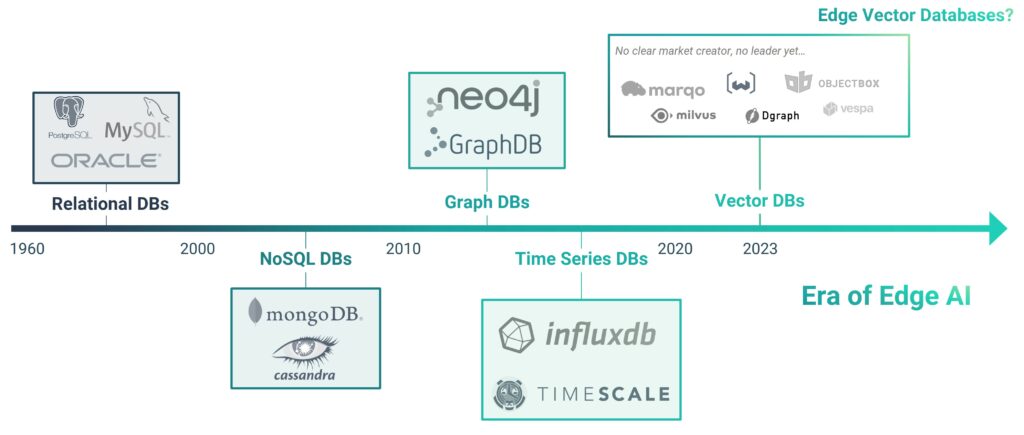
While being quite an established market with many players, the database market is still growing consistently and significantly. The reason is that databases are at the core of almost any digital solution, and directly impact business value and therefore never going out of fashion. With the rapid evolvements in the tech industry, however, databases evolve too. This, in turn, yields new database types and categories. We have seen the rise of NoSQL databases in the last 20 years, and more recently some novel database technologies, like graph databases and time-series databases, and vector databases.
With AI and accordingly vector databases being all the hype since 2022/2023, the database market is indeed experiencing fresh attention. Due to the speed with which AI is evolving, we’re however already leaving the “mainframe era of AI” and entering the distributed Edge AI space. With SQLite not supporting vector search and related vector database functions, this adds a new dimension to this ever-present topic. There is a need for local, on-device vector databases to support on-device AI that’s independent of an Internet connection, reliably fast, and keeps data on the device (100% private).
Both, the shift back from a centralised towards a decentralised paradigm, and the growing number of restricted devices call for a “new type” of an established database paradigm. SQLite has been around for more than 20 years and for good reason, but the current market shift back to decentralized computing happens in a new environment with new requirements. Hence, the need for a “new” database type, based on a well-established database type: “Edge databases”. Accordingly, a need for SQLite alternatives that consider the need for decentralized data flows and AI functionalities (depending on the use case of course; after all SQLite is a great database).
What is an Edge Database?
Edge databases are a type of databases that are optimised for local data storage on restricted devices, like embedded devices, Mobile, and IoT. Because they run on-device, they need to be especially resource-efficient (e.g. with regards to battery use, CPU consumption, memory, and footprint). The term “edge database” is becoming more widely-used every year, especially in the IoT industry. In IoT, the difference between cloud-based databases and ones that run locally (and therefore support Edge Computing) is crucial.
What is a Mobile Database?
We look at mobile databases as a subset of edge databases that run on mobile devices. The difference between the two terms lies mainly in the supported operating systems / types of devices. Unless Android and iOS are supported, an edge database is not really suited for the mobile device / smartphone market. In this article, we will use the term “mobile database” only as “database that runs locally on a mobile (edge) device and stores data on the device”. Therefore, we also refer to it as an “on-device” database.
What are the advantages and disadvantages of working with SQLite?
SQLite is a relational database that is clearly the most established database suitable to run on edge devices. Moreover, it is probably the only “established” mobile database. It was designed in 2000 by Richard Hipp and has been embedded with iOS and Android since the beginning. Now let’s have a quick look at its main advantages and disadvantages:
Advantages
Disadvantages
20+ years old (should be stable ;))
Toolchain, e.g. DB browser
No dependencies, is included with Android and iOS
Developers can define exactly the data schema they want
Full control, e.g. handwritten SQL queries
SQL is a powerful and established query language, and SQLite supports most of it
Debuggable data: developers can grab the database file and analyse it
20+ years old ( less state-of-the-art tech)
Using SQLite means a lot of boilerplate code and thus inefficiencies ( maintaining long running apps can be quite painful)
No compile time checks (e.g. SQL queries)
SQL is another language to master, and can impact your app’s efficiency / performance significantly…
The performance of SQLite is unreliable
SQL queries can get long and complicated
Testability (how to mock a database?)
Especially when database views are involved, maintainability may suffer with SQLite
What are the SQLite alternatives?
There are a bunch of options for making your life easier, if you want to use SQLite. You can use an object abstraction on top of it, an object-Relational-Mapper (ORM), for instance greenDAO, to avoid writing lots of SQL. However, you will typically still need to learn SQL and SQLite at some point. So what you really want is a full blown database alternative, like any of these: Couchbase Lite, Interbase, LevelDB, ObjectBox, Oracle Berkeley DB, Mongo Realm, SnappyDB, SQL Anywhere, or UnQLite.
While SQLite really is designed for small devices, people do run it on the server / cloud too. Actually, any database that runs efficiently locally, will be highly efficient on big servers too, making them a sustainable lightweight choice for some scenarios. However, for server / cloud databases, there are a lot of alternatives you can use as a replacement like e.g. MySQL, MongoDB, or Cloud Firestore.
Bear in mind that, if you are looking to host your database in the cloud with apps running on small distributed devices (e.g. mobile apps, IoT apps, any apps on embedded devices etc.), there are some difficulties. Firstly, this will result in higher latency, i.e. slow response-rates. Secondly, the offline capabilities will be highly limited or absent. As a result, you might have to deal with increased networking costs, which is not only reflected in dollars, but also CO2 emissions. On top, it means all the data from all the different app users is stored in one central place. This means that any kind of data breach will affect all your and your users’ data. Most importantly, you will likely be giving your cloud / database provider rights to that data. (Consider reading the general terms diligently). If you care about privacy and data ownership, you might therefore want to consider a local database option, as in an Edge Database. This way you can decide, possibly limit, what data you sync to a central instance (like the cloud or an on-premise server).
SQLite alternatives Comparison Matrix
To give you an overview, we have compiled a comparison table including SQLite and SQLite alternatives. In this matrix we look at databases that we believe are apt to run on edge devices. Our rule of thumb is the databases’ ability to run on Raspberry Pi type size devices. If you’re reading this on mobile, click here to view the full matrix.
Edge
Database
Short description
License / business model
Android / iOS*
Type of data stored
Central Data Sync
P2P Data Sync
Offline Sync (Edge)
Data level encryption
Flutter / Dart support
Vector Database (AI support)
Minimum Footprint size
Company
SQLite
C programming library;
probably still 90% market share in the small devices space (personal
assumption)
Embedded / portable database
with P2P and central synchronization (sync) support; pricing upon
request; some restrictions apply for the free version. Secure SSL.
Partly proprietary, partly
open-source, Couchbase Lite is BSL 1.1
Is there anything we’ve missed? What do you agree and disagree with? Please share your thoughts with us via Twitter or email us on contact[at]objectbox.io.
We are happy to announce version 3.1 of ObjectBox for Java and Kotlin. The major feature of this version is the new Flex type. For a long time, ObjectBox worked on rigid data schemas, and we think that this is a good thing. Knowing what your data looks like is a feature – similar to programming languages that are statically typed. Fixed schemas make data handling more predictable and robust. Nevertheless, sometimes there are use cases which require flexible data structures. ObjectBox 3.1 allows exactly this.
Flex properties
Expanding on the string and flexible map support in 3.0.0, this release adds support for Flex properties where the type must not be known at compile time. To add a Flex property to an entity use Object in Java and Any? in Kotlin. Then at runtime store any of the supported types.
For example, assume a customer entity with a tag property:
1
2
3
4
5
6
7
8
9
10
11
12
13
14
15
16
17
// Java
@Entity
publicclassCustomer{
@Id
privatelongid;
privateObjecttag;
// TODO getter and setter
}
// Kotlin
@Entity
data classCustomer(
@Id varid:Long=0,
vartag:Any?=null
)
Then set a String tag on one customer, and an Integer tag on another customer and just put them:
1
2
3
4
5
6
7
8
9
10
11
// Java
Customer customerStrTag=newCustomer();
customerStrTag.setTag("string-tag");
Customer customerIntTag=newCustomer();
customerIntTag.setTag(1234);
box.put(customerStrTag,customerIntTag);
// Kotlin
val customerStrTag=Customer(tag="string-tag")
val customerIntTag=Customer(tag=1234)
box.put(customerStrTag,customerIntTag)
When getting the customer from its box the original type is restored. For simplicity the below example just casts the tag to the expected type:
1
2
3
4
5
6
7
8
9
// Java
StringstringTag=(String)
box.get(customerStrTag.getId()).getTag();
IntegerintTag=(Integer)
box.get(customerIntTag.getId()).getTag();
// Kotlin
val stringTag=box.get(customerStrTag.id).tag asString
val intTag=box.get(customerIntTag.id).tag asInt
A Flex property can be not justString or Integer. Supported types are all integers (Byte, Short, Integer, Long), floating point numbers (Float, Double), String and byte arrays.
It can also hold a List<Object> or a Map<String, Object> of those types. Lists and maps can be nested.
Behind the scenes Flex properties use a FlexBuffer converter to store the property value, so some limitations apply. See the FlexObjectConverter class documentation for details.
Query for map keys and values
If the Flex property contains integers or strings, or a list or map of those types, it’s also possible to do queries. For example, take this customer entity with a properties String to String map:
1
2
3
4
5
6
7
8
9
10
11
12
13
14
15
16
// Java
@Entity
publicclassCustomer{
@Id
privatelongid;
privateMap<String,String>properties;
// TODO getter and setter
}
// Kotlin
@Entity
data classCustomer(
@Id varid:Long=0,
varproperties:MutableMap<String,String>?=null
)
Why is properties not of type Object? ObjectBox supports using Map<String, String> (or Map<String, Object>) directly and will still create a Flex property behind the scenes.
Then put a customer with a premium property:
1
2
3
4
5
6
7
8
9
10
11
12
// Java
Customer customer=newCustomer();
Map<String,String>properties=newHashMap<>();
properties.put("premium","tier-1");
customer.setProperties(properties);
box.put(customer);
// Kotlin
val customer=Customer(
properties=mutableMapOf("premium"to"tier-1")
)
box.put(customer)
To query for any customers that have a premium key in their properties map, use the containsElement condition:
1
2
3
4
5
6
7
8
9
10
// Java
Query<customer>queryPremiumAll=box.query(
Customer_.properties.containsElement("premium")
).build();
// Kotlin
val queryPremiumAll=box.query(
Customer_.properties.containsElement("premium")
).build()
</customer>
Or to only match customers where the map key has a specific value, here a specific premium tier, use the containsKeyValue condition:
ObjectBox database is free to use. Check out our docs and this video tutorial to get started today.
We strive to bring joy to mobile developers and appreciate all kinds feedback, both positive and negative. You can always raise an issue on GitHub or post a question on Stackoverflow. Otherwise, star the ObjectBox Java database GitHub repo and up-vote the features you’d like to see in the next release.
The Android database for superfast Java / Kotlin data persistence goes 3.0. Since our first 1.0-release in 2017 (Android-first, Java), we have released C/C++, Go, Flutter/Dart, Swift bindings, as well as Data Sync and we’re thrilled that ObjectBox has been used by over 800,000 developers.
We love our Java / Kotlin community ❤️ who have been with us since day one. So, with today’s post, we’re excited to share a feature-packed new major release for Java Database alongside CRUD performance benchmarks for MongoDB Realm, Room (SQLite) and ObjectBox.
What is ObjectBox?
ObjectBox is a high performance database and an alternative to SQLite and Room. ObjectBox empowers developers to persist objects locally on Mobile and IoT devices. It’s a NoSQL ACID-compliant object database with an out-of-the-box Data Sync providing fast and easy access to decentralized edge data (Early Access).
In Kotlin, the condition methods are also available as infix functions. This can help make queries easier to read:
1
val query=box.query(User_.firstName equal"Joe").build()
Unique on conflict replace strategy
One unique property in an @Entity can now be configured to replace the object in case of a conflict (“onConflict”) when putting a new object.
1
2
3
4
5
6
7
8
9
10
11
12
13
14
15
16
17
18
19
// Kotlin
@Entity
data classExample(
@Id
varid:Long=0,
@Unique(onConflict=ConflictStrategy.REPLACE)
varuniqueKey:String?=null
)
// Java
@Entity
publicclassExample{
@Id
publiclongid;
@Unique(onConflict=ConflictStrategy.REPLACE)
StringuniqueKey;
}
This can be helpful when updating existing data with a unique ID different from the ObjectBox ID. E.g. assume an app that downloads a list of playlists where each has a modifiable title (e.g. “My Jam”) and a unique String ID (“playlist-1”). When downloading an updated version of the playlists, e.g. if the title of “playlist-1” has changed to “Old Jam”, it is now possible to just do a single put with the new data. The existing object for “playlist-1” is then deleted and replaced by the new version.
Built-in string array and map support
String array or string map properties are now supported as property types out-of-the-box. For string array properties it is now also possible to find objects where the array contains a specific item using the new containsElement condition.
We compared against the Android databases, MongoDB Realm and Room (on top of SQLite) and are happy to share that ObjectBox is still faster across all four major database operations: Create, Read, Update, Delete.
We benchmarked ObjectBox along with Room 2.3.0 using SQLite 3.22.0 and MongoDB Realm 10.6.1 on an Samsung Galaxy S9+ (Exynos) mobile phone with Android 10. All benchmarks were run 10+ times and no outliers were discovered, so we used the average for the results graph above. Find our open source benchmarking code on GitHub and as always: feel free to check them out yourself. More to come soon, follow us on Twitter or sign up to our newsletter to stay tuned (no spam ever!).
Using a fast on-device database matters
A fast local database is more than just a “nice-to-have.” It saves device resources, so you have more resources (CPU, Memory, battery) left for other resource-heavy operations. Also, a faster database allows you to keep more data locally with the device and user, thus improving privacy and data ownership by design. Keeping data locally and reducing data transferal volumes also has a significant impact on sustainability.
Sustainable Data Sync
Some data, however, you might want or need to synchronize to a backend. Reducing overhead and synchronizing data selectively, differentially, and efficiently reduces bandwidth strain, resource consumption, and cloud / Mobile Network usage – lowering the CO2 emissions too. Check out ObjectBox Data Sync, if you are interested in an out-of-the-box solution.
Get Started with ObjectBox for Java / Kotlin Today
Already an ObjectBox Android database user and ready to take your application to the next level? Check out ObjectBox Data Sync, which solves data synchronization for edge devices, out-of-the-box. It’s incredibly efficient and (you guessed it) superfast 😎
We ❤️ your Feedback
We believe, ObjectBox is super easy to use. We are on a mission to make developers’ lives better, by building developer tools that are intuitive and fun to code with. Now it’s your turn: let us know what you love, what you don’t, what do you want to see next? Share your feedback with us, or check out GitHub and up-vote the features you’d like to see next in ObjectBox.
We use cookies to ensure that we give you the best experience on our website. If you continue to use this site we will assume that you are happy with it.